> ## Documentation Index
> Fetch the complete documentation index at: https://docs.performax.ai/llms.txt
> Use this file to discover all available pages before exploring further.
# Dashboard
> Account status, performance, risk and open positions at a glance.
Dashboard is the home view for account status, performance, risk, activity, and open positions.
Read it as an overview. Use [Analytics](/features/analytics) and the [Trading Journal](/features/journal) to inspect the underlying trades.
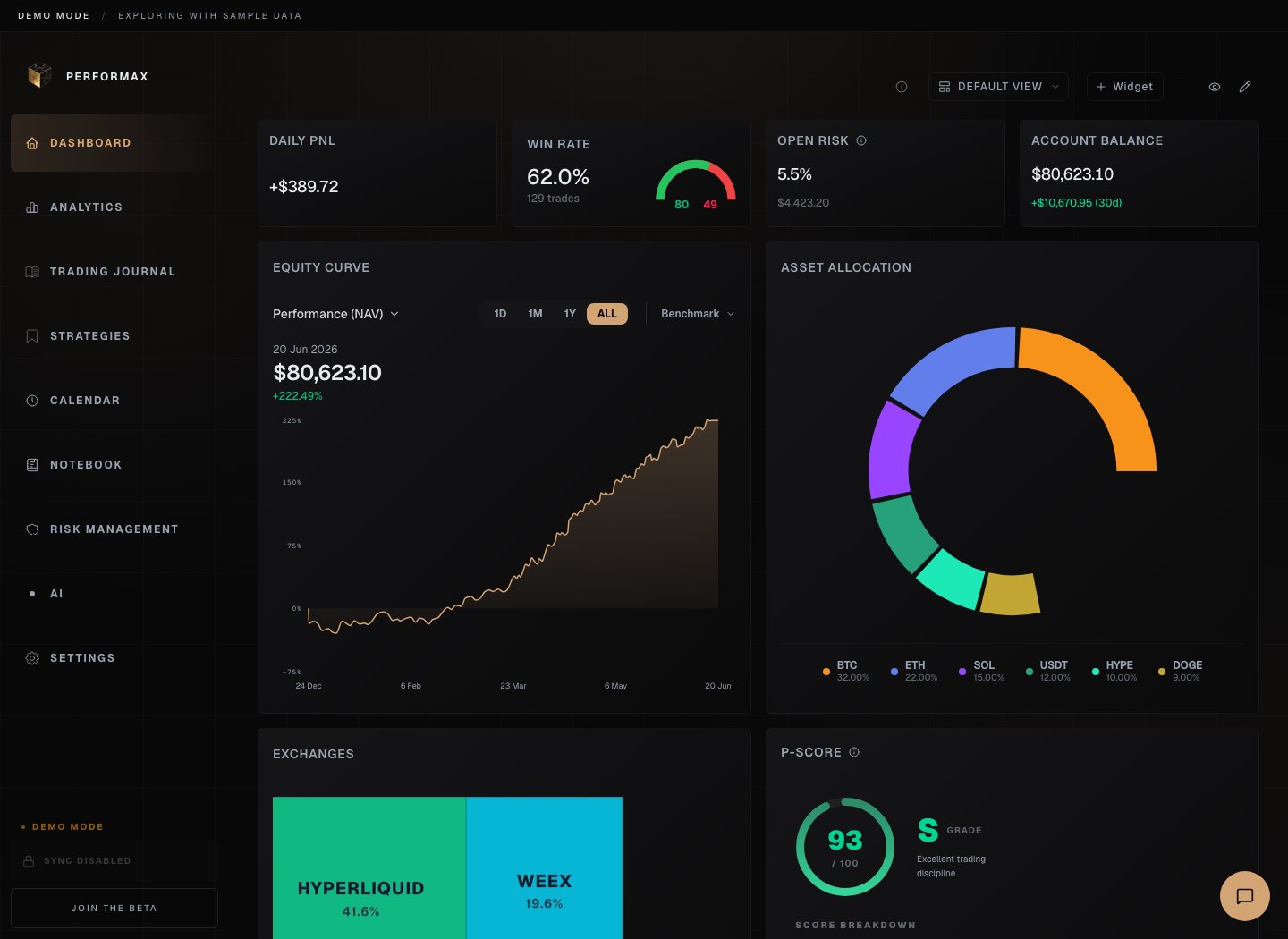 *Demo account. Turn on privacy mode before sharing real account screenshots.*
## Before reading widgets
Check:
* selected account scope;
* base currency;
* first sync status;
* whether balances and cashflows are available;
* privacy mode state.
Some widgets are empty until trades, positions, or cashflows exist.
## Core widgets
| Widget | Data basis | What to check |
| ------------------ | ---------------------------------------------- | ------------------------------------------- |
| Daily P\&L | Realized and available intraday account data | Timezone and selected account. |
| Win Rate | Closed trades | No closed trades means no valid value. |
| Open Risk | Open positions and risk settings | Requires position data and configured risk. |
| Account Balance | Exchange balances and base-currency conversion | Can lag if balance sync is stale. |
| Total P\&L | Closed trades in scope | Cashflows are not trading P\&L. |
| Sharpe Ratio | Return series | Noisy on short samples. |
| Average R-Multiple | Trade result divided by risk | Requires configured risk inputs. |
| Profit Factor | Gross profit / gross loss | Use with closed trades only. |
## Curves and charts
| Chart | Meaning | Notes |
| ----------------- | ------------------------------- | -------------------------------------------------------------------------- |
| Equity Curve | Trading performance over time | Performance mode should isolate deposits and withdrawals when data exists. |
| Balance Curve | Actual account balance | Includes deposits and withdrawals. |
| Volume Curve | Trading volume over time | Useful for spotting overtrading or inactivity. |
| Drawdown Recovery | Underwater periods and recovery | Cashflow completeness affects trust. |
| Calendar Widget | Recent day-level P\&L | Open the Calendar for full daily review. |
## Exposure and positions
| Widget | Meaning |
| --------------------- | ------------------------------------------------------------------------------------- |
| Active Positions | Current open positions with entry, size, direction, and current P\&L where available. |
| Exposure Bar | Long, short, gross, and per-asset exposure. |
| Asset Allocation | Position concentration by asset. |
| Exchange Distribution | Activity and P\&L by connected exchange. |
Open-position widgets depend on each exchange's available position endpoints.
## Behavior widgets
| Widget | Meaning |
| ------------------ | ------------------------------------------------------ |
| Tilt Score | Flags behavior that may indicate emotional trading. |
| Overtrading Alert | Compares recent trade count with normal activity. |
| First Trade of Day | Compares first trades against later trades. |
| Post Win Behavior | Reviews behavior after winning trades. |
| Break Reminder | Reminds you to pause according to configured behavior. |
These widgets describe your history and configured thresholds. They do not control exchange trading.
## AI and Coach widgets
Daily Briefing and AI widgets summarize observed data patterns. Coach widgets show deterministic rule status based on rules you enabled.
Neither widget type is a trading signal.
## Customization
Use edit mode to:
* add widgets;
* remove widgets;
* resize widgets;
* rearrange layout.
On mobile, long-press a widget to move it when the app exposes mobile edit mode.
*Demo account. Turn on privacy mode before sharing real account screenshots.*
## Before reading widgets
Check:
* selected account scope;
* base currency;
* first sync status;
* whether balances and cashflows are available;
* privacy mode state.
Some widgets are empty until trades, positions, or cashflows exist.
## Core widgets
| Widget | Data basis | What to check |
| ------------------ | ---------------------------------------------- | ------------------------------------------- |
| Daily P\&L | Realized and available intraday account data | Timezone and selected account. |
| Win Rate | Closed trades | No closed trades means no valid value. |
| Open Risk | Open positions and risk settings | Requires position data and configured risk. |
| Account Balance | Exchange balances and base-currency conversion | Can lag if balance sync is stale. |
| Total P\&L | Closed trades in scope | Cashflows are not trading P\&L. |
| Sharpe Ratio | Return series | Noisy on short samples. |
| Average R-Multiple | Trade result divided by risk | Requires configured risk inputs. |
| Profit Factor | Gross profit / gross loss | Use with closed trades only. |
## Curves and charts
| Chart | Meaning | Notes |
| ----------------- | ------------------------------- | -------------------------------------------------------------------------- |
| Equity Curve | Trading performance over time | Performance mode should isolate deposits and withdrawals when data exists. |
| Balance Curve | Actual account balance | Includes deposits and withdrawals. |
| Volume Curve | Trading volume over time | Useful for spotting overtrading or inactivity. |
| Drawdown Recovery | Underwater periods and recovery | Cashflow completeness affects trust. |
| Calendar Widget | Recent day-level P\&L | Open the Calendar for full daily review. |
## Exposure and positions
| Widget | Meaning |
| --------------------- | ------------------------------------------------------------------------------------- |
| Active Positions | Current open positions with entry, size, direction, and current P\&L where available. |
| Exposure Bar | Long, short, gross, and per-asset exposure. |
| Asset Allocation | Position concentration by asset. |
| Exchange Distribution | Activity and P\&L by connected exchange. |
Open-position widgets depend on each exchange's available position endpoints.
## Behavior widgets
| Widget | Meaning |
| ------------------ | ------------------------------------------------------ |
| Tilt Score | Flags behavior that may indicate emotional trading. |
| Overtrading Alert | Compares recent trade count with normal activity. |
| First Trade of Day | Compares first trades against later trades. |
| Post Win Behavior | Reviews behavior after winning trades. |
| Break Reminder | Reminds you to pause according to configured behavior. |
These widgets describe your history and configured thresholds. They do not control exchange trading.
## AI and Coach widgets
Daily Briefing and AI widgets summarize observed data patterns. Coach widgets show deterministic rule status based on rules you enabled.
Neither widget type is a trading signal.
## Customization
Use edit mode to:
* add widgets;
* remove widgets;
* resize widgets;
* rearrange layout.
On mobile, long-press a widget to move it when the app exposes mobile edit mode.
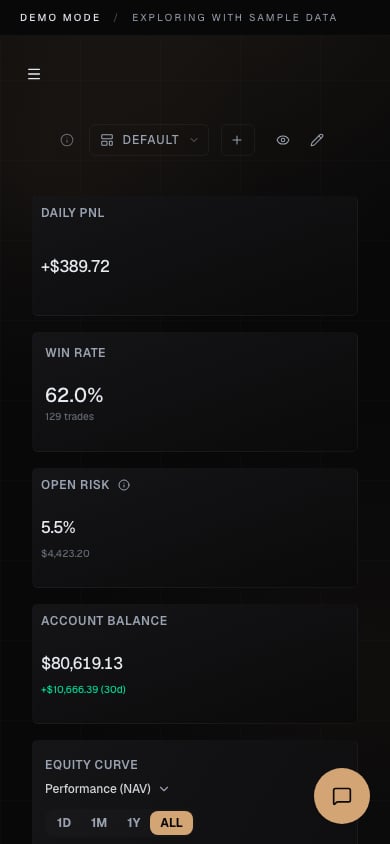 *Mobile demo. Widgets stack in one column.*
## Privacy mode
Privacy mode hides sensitive monetary values for screenshots or screen sharing. It changes display only; it does not change stored data or calculations.
## Empty and partial states
Common causes:
* no exchange connected;
* first sync still running;
* no closed trades in selected scope;
* exchange balance unavailable;
* cashflows missing;
* credentials expired.
Use the Journal and account card sync status to confirm whether the issue is missing data or a widget-level display state.
*Mobile demo. Widgets stack in one column.*
## Privacy mode
Privacy mode hides sensitive monetary values for screenshots or screen sharing. It changes display only; it does not change stored data or calculations.
## Empty and partial states
Common causes:
* no exchange connected;
* first sync still running;
* no closed trades in selected scope;
* exchange balance unavailable;
* cashflows missing;
* credentials expired.
Use the Journal and account card sync status to confirm whether the issue is missing data or a widget-level display state.